Print Automation Tools 2026: 8 Categories Every Ops Team Should Know
"Print automation tools" is one of those terms that means eight different things depending on who's saying it. A print shop owner means one thing. A logistics manager means another. An accountant means a third.
Buying the wrong category costs months and sometimes thousands of dollars. Here are the eight categories, what each actually does, and how to know which one you need.
Table of Contents
- Category 1: Email-to-Print (Auto-Print)
- Category 2: Print-and-Mail Outsourcing
- Category 3: Print-Server / Print-Management Suites
- Category 4: Cloud Print Services
- Category 5: Programmatic Print APIs
- Category 6: Document Conversion + Print Pipelines
- Category 7: Industry-Specific Order Print Routers
- Category 8: Marketing / Direct Mail Automation
- The 30-Second Mapping
- Where AutoPrintEmail Fits
- The Common Mistake
- TL;DR
Category 1: Email-to-Print (Auto-Print)
What it does: Watches an inbox; automatically prints emails matching rules you set.
Use case: Vendor invoices print as they arrive. Kitchen tickets print at the receipt printer. K-1s print for the accountant's desk. Everything that needs to go from email-to-paper-fast.
Examples: AutoPrintEmail, Sperry AutoPrint, Automatic Email Manager, FolderMill, MAPILab Print Tools.
Pricing: $15-$30/month or $99-$500 lifetime per computer.
Right for: Small-to-mid businesses with email-driven document flow. AP, restaurants, dispatch, accounting, healthcare.
Wrong for: Mass mailings to customers. Printing to remote facilities you don't control.

Category 2: Print-and-Mail Outsourcing
What it does: API or web upload → printed at regional facility → folded, stuffed, stamped, mailed.
Use case: Year-end 1099s to 200 contractors. Customer invoices for clients who insist on physical. Regulatory mail (1098-T, healthcare benefit summaries).
Examples: Lob, Click2Mail, PostGrid, Mailform, Postable.
Pricing: $0.85-$2.00 per piece, all-in including postage.
Right for: Businesses with real outbound mail volume (500+/month) or regulated mailing requirements.
Wrong for: In-office filing. Anything where the paper stays in your building.

Category 3: Print-Server / Print-Management Suites
What it does: Centralized print spooler/queue management for big organizations. Tracks print jobs across hundreds of users, allocates quotas, charges back departments, manages driver deployment.
Use case: University printing 50,000 pages/day. Enterprise IT department wanting print quotas and audit logs across 500 users.
Examples: PaperCut, Printix, Pharos, uniFLOW.
Pricing: $5-$15/user/month or perpetual licenses with annual maintenance.
Right for: 500+ user organizations where print is a real cost center.
Wrong for: Anyone under 100 users. Massive overkill.

Category 4: Cloud Print Services
What it does: Bridge your office printers to the internet so anyone authenticated can print to them from anywhere.
Use case: Remote workers needing to print to the office printer. Mobile-driven workflows printing without a USB cable.
Examples: PrinterLogic (now Vasion), ezeep, PrintNode (a sub-category — see below), Microsoft Universal Print.
Pricing: $1-$5/user/month.
Right for: Hybrid workforces with central printers people print to from home or the road.
Wrong for: Single-location offices. Printing from email automatically (different category).

Category 5: Programmatic Print APIs
What it does: Developer-facing API to send print jobs from your software to a connected printer. You write code; printer prints.
Use case: Custom POS systems printing receipts. Internal tools that print labels. SaaS dashboards that need a "print to office printer" button.
Examples: PrintNode, ezeep API, Cloud Print Hub.
Pricing: $10-$50/month per printer.
Right for: Engineering teams building software that has to interact with physical printers.
Wrong for: End-users. You'd never buy this if you don't have a developer.

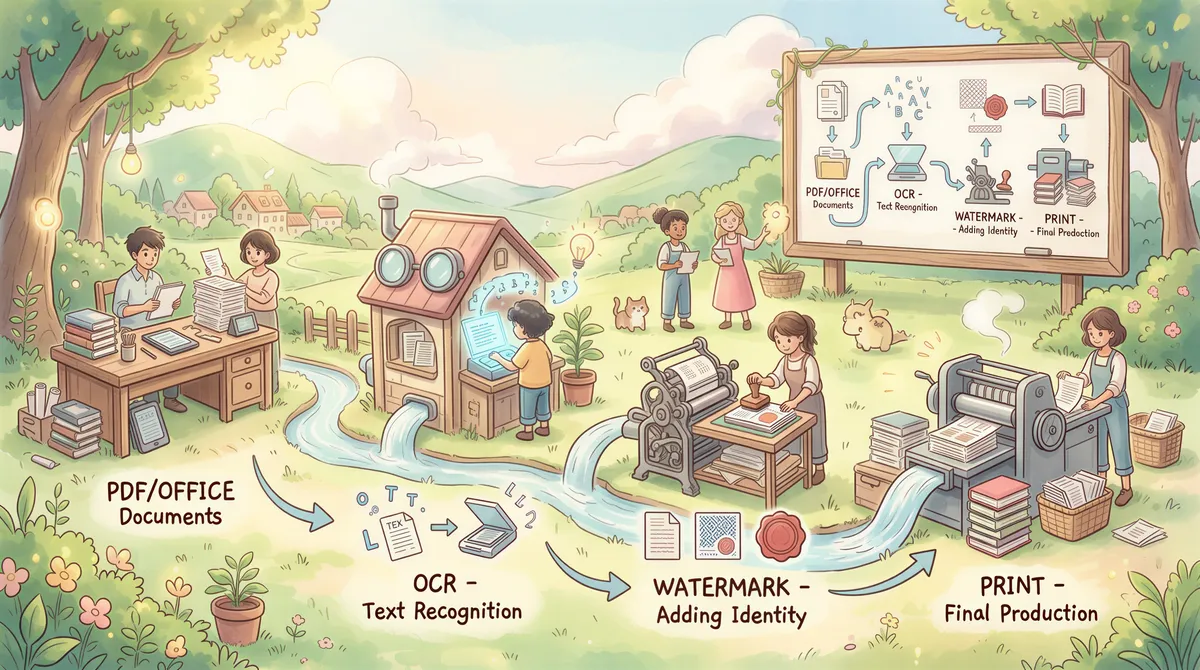
Category 6: Document Conversion + Print Pipelines
What it does: Watches a folder, applies transformations (PDF conversion, OCR, redaction, watermarking), then prints or files the result.
Use case: Receive faxed PDFs that need OCR, watermarking, then printing for archive. Automated filing of incoming documents to specific archives based on content.
Examples: FolderMill (also fits category 1), AutoMate, ABBYY FineReader Server, Black Ice Print Manager.
Pricing: $200-$2,000 perpetual licenses depending on features.
Right for: Document-heavy workflows where transformation + routing is the value.
Wrong for: Pure email-to-print needs. Auto-print apps are simpler and cheaper.
Category 7: Industry-Specific Order Print Routers
What it does: Receives orders from POS / e-commerce / restaurant platforms via API and prints them to the right printer based on rules (e.g., kitchen station 1 vs station 2).
Use case: Restaurant with multiple kitchens routing DoorDash, Uber Eats, GrubHub orders to the right station automatically.
Examples: Otter, Cuboh, ChowNow's printer feature, Toast's print routing.
Pricing: Often bundled with the POS subscription; standalone routers are $50-$200/month per location.
Right for: Restaurants, retail with complex multi-printer setups.
Wrong for: Email-driven workflows (use auto-print) or single-printer setups.

Category 8: Marketing / Direct Mail Automation
What it does: Trigger physical mail pieces from CRM events. Like email marketing, but with paper.
Use case: Send a postcard when a customer churns. Trigger a thank-you note when an enterprise deal closes. Automated direct-mail campaigns linked to CRM data.
Examples: PostalGrow (PostGrid's marketing tier), Sendoso (gifting + mail), Postal.io, Reachdesk.
Pricing: $200-$2,000+/month.
Right for: Sales/marketing teams with budgets for high-touch direct mail.
Wrong for: Operational printing of business documents.

The 30-Second Mapping
Look at where the paper needs to end up:
- In your office, on a desk: Category 1 (auto-print).
- In a customer's mailbox: Category 2 (print-and-mail).
- At a managed print fleet: Category 3 (print-server suite).
- At an office printer from a remote worker: Category 4 (cloud print).
- From your custom code to a printer: Category 5 (programmatic print API).
- After OCR/watermark/transform, then printed: Category 6 (conversion pipeline).
- At specific kitchen/warehouse stations from POS data: Category 7 (order router).
- As a marketing touchpoint: Category 8 (direct mail automation).
If your need spans multiple categories, you'll buy multiple tools. Don't try to force one category to do another's job — that's where wasted spend happens.
Where AutoPrintEmail Fits
AutoPrintEmail is squarely Category 1. It watches inboxes and prints to printers in your office. Pricing is $29/month flat or $499 lifetime per computer, with a team plan for multi-user organizations that adds centralized billing and an admin dashboard with print analytics per user.
We do not do mailing (Category 2). We do not do print servers (3). We do not do remote-cloud-print (4). We do not have a public API (5). We don't transform documents beyond converting Office files to PDF for printing (6 lite). We don't route to specific kitchen stations from POS data (7). We are not a direct-mail marketing platform (8).
The point of being in one category is being good at it. If you need any of the other seven, buy a tool from that category instead.
The Common Mistake
The most expensive mistake we see: companies buy a Category 3 print-server suite (PaperCut etc.) trying to solve a Category 1 auto-print problem. They spend $20K and 3 months on deployment when the actual need was a $29/month app for the bookkeeper.
Reverse mistake: buying auto-print software when the actual need is print-and-mail outsourcing. The paper has to leave your building; auto-print won't help.
The right question is always: where does the paper need to end up, and what triggers the print? Pick the category that answers both.
TL;DR
| Category | Right for | Pricing |
|---|---|---|
| Email-to-print (auto-print) | Email-driven docs to office printer | $15-$30/mo or $99-$500 lifetime |
| Print-and-mail | Customer mailings, regulatory | $0.85-$2/piece |
| Print server / management | 500+ user orgs | $5-$15/user/mo |
| Cloud print | Hybrid workforces | $1-$5/user/mo |
| Programmatic print API | Custom dev workflows | $10-$50/mo per printer |
| Conversion + print | OCR/transform pipelines | $200-$2K perpetual |
| Order print routers | Restaurants, multi-printer ops | $50-$200/mo per location |
| Direct mail automation | Sales/marketing campaigns | $200-$2K+/mo |

Need an email-to-print tool? Start a free 3-day trial of AutoPrintEmail. For multi-user orgs, the team plan.
Need anything else? Buy from that category. Don't pay for ours.
Ready to get started?
Start printing your emails today.
Nearly 90,000 emails have printed themselves so far — no one opening an inbox, no one clicking print.