AutoPrintEmail
    How It WorksTeamsPricingDownloadHelp
    Sign InGet Started Free
    1. Help
    2. Add a Free Admin Login That Doesn't Print
    On this page
    If you're adding yourself to an existing teamIf your own login is the one that started the teamGood to know
    Team & Computers

    Add a Free Admin Login That Doesn't Print

    2 min read

    The computer in the back office signs in as orders@yourshop.com. You'd like to manage billing and settings from your own email, without borrowing that inbox every time you need a sign-in link.

    Good news: a login that doesn't print is free. Add yours as an admin, switch its printing off, and it never counts as a computer.


    Table of Contents

    • If you're adding yourself to an existing team
    • If your own login is the one that started the team
    • Good to know

    If you're adding yourself to an existing team

    1. Ask an admin to invite your email from autoprint.email/team > Members, with This person prints (a print station) switched off.
    2. Accept the invite from the email, using Accept invite on web.
    3. The admin clicks Make Admin next to your name.

    You now sign in to the web with your own email and see everything: members, billing, invoices. The print computer keeps running as before.

    If your own login is the one that started the team

    Maybe you set the team up from your own email, and a separate login does the printing. Switch your login off so it stops counting:

    1. Go to Members and find your row.
    2. Click Print desk next to your name.
    3. Confirm Stop printing in the box that pops up.

    The Stop printing from your login? confirmation on the Members page

    Your row now says Not printing. You keep full admin access, and one computer is freed up for a print station.
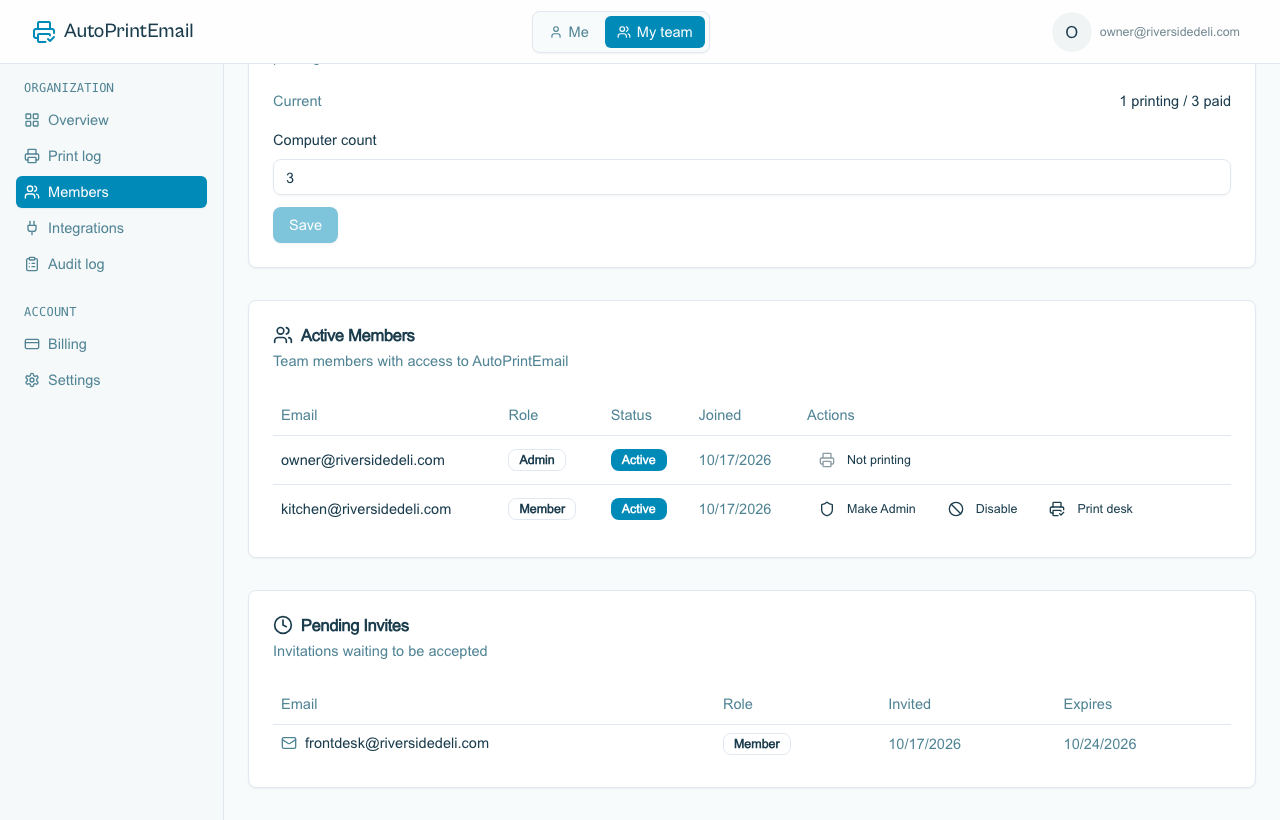
    The owner's login marked Not printing in the members list

    Good to know

    • Any computer signed in as a Not printing login stops printing. Only do this for a login that isn't the one on the print computer.
    • Changed your mind? Click Not printing to switch it back to Print desk. It needs a free computer on the team; raise the Computer count first if there isn't one.
    • IT providers: this is the setup to use for a client. Your login is an admin that doesn't print, and each of the client's computers has its own login. See Add a Computer or Team Member.
    AutoPrintEmail

    The desktop app that sends emails directly to your printer. Reduce screen time without missing important communications.

    Quick Links

    • Automated Email Printing Guide
    • Benefits
    • How It Works
    • For Teams
    • Testimonials
    • Reviews on Trustpilot
    • FAQ
    • Privacy Policy
    • Terms of Service
    • Blog
    • About

    Download

    Get started with AutoPrintEmail today and receive a 3-day free trial.

    Get Started Free

    Email Printing

    • Automatically Print Email Attachments (PDF, Word, Excel)
    • Auto-Print Email Invoices & Receipts | Automatic Business Printing
    • Auto-Print Gmail Emails (2026 Guide) | Automatic Gmail Printing
    • Auto-Print Outlook & Office 365 Emails: No Plugin, 24/7
    • Email Printing Automation for Business Operations | Secure & Reliable
    • Click-and-Collect for Small Shops: The Complete Weekend Recipe
    • Email to Print Software: Auto-Print Emails & Attachments to Any Printer

    Compare

    • AutoPrintEmail vs ItJustPrints - Desktop or Mobile Print Station?

    Integrations

    • Auto-Print Gmail Attachments & Emails - Set It and Forget It
    • Auto-Print Outlook Emails Without a Plugin | Standalone Desktop App
    • Auto-Print Office 365 Emails: No Plugin Required
    • Auto-print Shopify inventory transfers, orders, and labels
    • Auto-Print Etsy Orders & Packing Slips - Handmade Seller Automation
    • Auto-Print IMAP/POP3 Emails - Works with Any Email Provider
    • Auto-Print Square Orders - Kitchen Tickets & Receipts
    • Auto-Print Toast POS Orders - Kitchen Ticket Printing
    • Auto-Print ShipStation Orders - Packing Slips & Shipping Labels
    • Print From Zapier Automatically - Orders, Forms and Alerts on Paper
    • Print API - Send Print Jobs to Any Printer With One HTTP Request

    Solutions

    • Email to Print - Auto-Print Emails to Any Printer
    • Auto-Print Invoices from Email: AP & AR Automation
    • Stop Manually Printing E-commerce Invoices - Automate in 2 Minutes
    • Restaurant Order Printing Automation - Auto-Print Delivery Orders
    • Legal & Real Estate Document Printing Automation
    • Logistics Waybill & Shipping Label Automation
    • Healthcare Document Printing Automation - HIPAA-Compliant Local Processing
    • Pharmacy Email Printing Software - Auto-Print Wholesaler Invoices, PBM Notices, and Compliance Docs
    • Accounting Firm Document Automation - Auto-Print Tax Docs & Client Files
    • Auto Shop Document Automation - Print Work Orders & Estimates Automatically
    • Insurance Agency Document Automation - Auto-Print Policies, COIs & Claims
    • Auto-Print Faxes From Email, Without a Fax Machine

    © 2026 AutoPrintEmail. All rights reserved.

    Privacy PolicyTerms of ServiceSecurity