AutoPrintEmail
    How It WorksTeamsPricingDownloadHelp
    Sign InGet Started Free
    1. Help
    2. Stop Printing Emails From One Sender
    On this page
    Add a "Don't print" ruleHow it works with your other rulesOn an older version?
    Email Monitoring

    Stop Printing Emails From One Sender

    3 min read

    Everything prints. That's the point. Except for that one address: the bank statements, the newsletter, the colleague who CCs the whole office. Those just burn paper.

    You don't have to give up printing everything to fix it. Add one "Don't print" rule and that sender is skipped. Everything else keeps printing like before.


    Table of Contents

    • Add a "Don't print" rule
    • How it works with your other rules
    • On an older version?

    Add a "Don't print" rule

    1. Update AutoPrintEmail to the latest version from autoprint.email/download.
    2. Open the app, go to your email accounts and click Manage on the account.
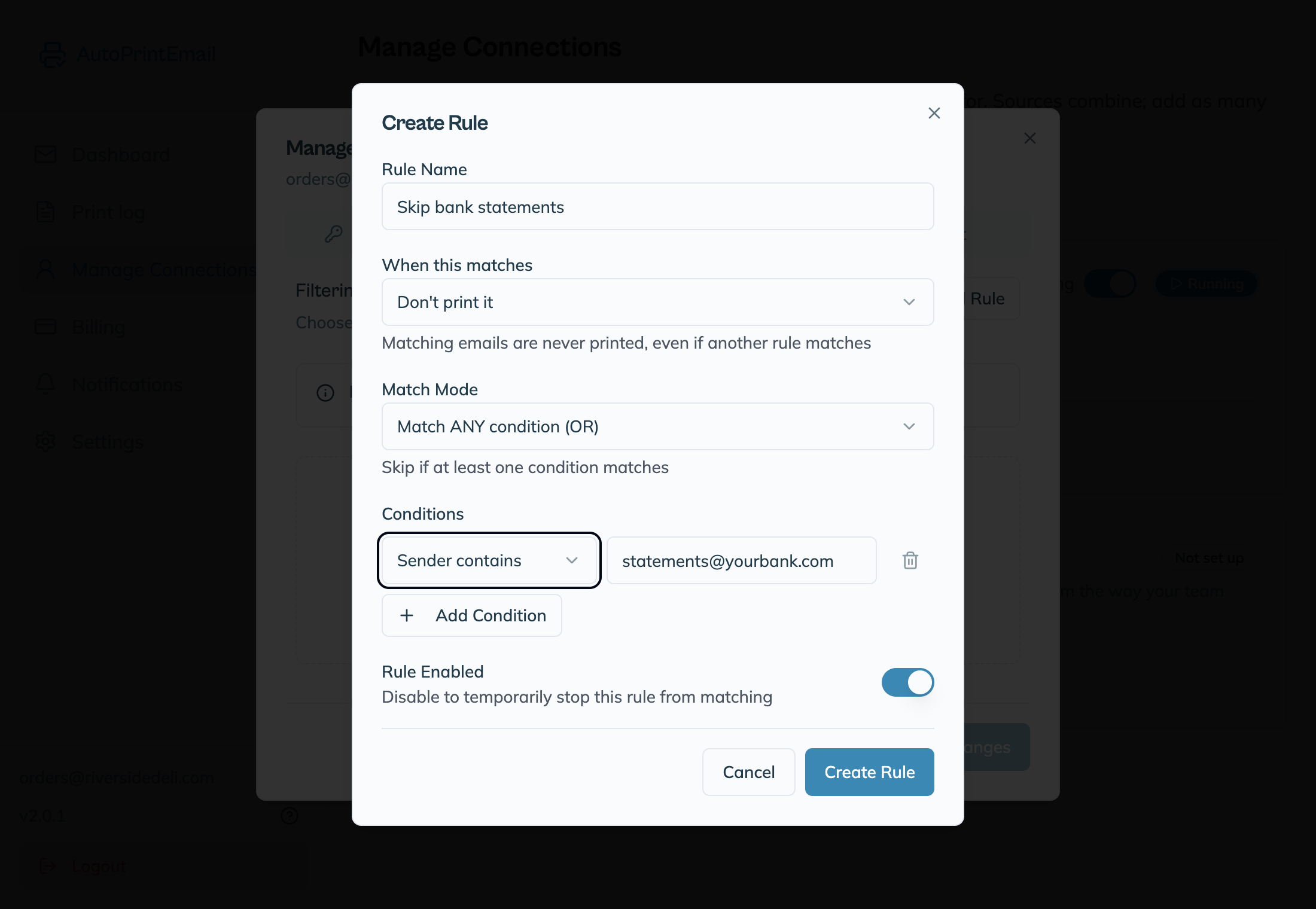
    3. Open the Rules tab and click Add Rule.
    4. Give it a name, like "Skip statements".
    5. Set When this matches to Don't print it.
    6. Change the condition to Sender contains and type the address, for example statements@yourbank.com.
    7. Click Create Rule, then Save Changes.

    The rule shows a Don't print badge in the list. Done.

    No Don't print it option there? Your build is older than the feature. Check for updates, and until it reaches you use the mail rule workaround at the end of this guide.

    A few tips:

    • Block a whole domain by typing just the domain, like @yourbank.com.
    • Block by subject with Subject contains instead, like Newsletter.
    • Block several senders in one rule by adding more conditions and keeping Match ANY condition.
    • Pause it with the switch next to the rule. A disabled rule does nothing.

    How it works with your other rules

    Two simple rules decide what prints:

    Your rulesWhat prints
    No rulesEvery email
    Only "Don't print" rulesEvery email, except the ones they match
    Only print rulesOnly emails that match a print rule
    Both kindsEmails that match a print rule, unless a "Don't print" rule also matches

    "Don't print" always wins. If an email matches a print rule and a "Don't print" rule, it is skipped.

    "Sender contains" checks the sender's name and address, and it ignores upper and lower case. So accounts would match both accounts@shop.com and "Accounts Team". Use the full address if you only want one sender.

    On an older version?

    If you can't update right now, do it in your email instead. Set up a rule in Gmail or Outlook that moves mail from that sender into another folder as it arrives. AutoPrintEmail only watches the folders you picked, so those emails never print.

    If you use Outlook, create that rule in Outlook on the web so it runs even when your PC is off. Here's why that matters.

    AutoPrintEmail

    The desktop app that sends emails directly to your printer. Reduce screen time without missing important communications.

    Quick Links

    • Automated Email Printing Guide
    • Benefits
    • How It Works
    • For Teams
    • Testimonials
    • Reviews on Trustpilot
    • FAQ
    • Privacy Policy
    • Terms of Service
    • Blog
    • About

    Download

    Get started with AutoPrintEmail today and receive a 3-day free trial.

    Get Started Free

    Email Printing

    • Automatically Print Email Attachments (PDF, Word, Excel)
    • Auto-Print Email Invoices & Receipts | Automatic Business Printing
    • Auto-Print Gmail Emails (2026 Guide) | Automatic Gmail Printing
    • Auto-Print Outlook & Office 365 Emails: No Plugin, 24/7
    • Automatic Email Manager Alternative: Just the Printing, Please
    • Email Printing Automation for Business Operations | Secure & Reliable
    • Click-and-Collect for Small Shops: The Complete Weekend Recipe
    • Email to Print Software: Auto-Print Emails & Attachments to Any Printer
    • MAPILab Print Tools Alternative: Print Email Without Babysitting Outlook
    • PaperCut Email to Print Alternative: Email Printing Without the IT Department
    • PrintNode Alternative: Auto-Print Emails Without APIs or Zapier
    • Sperry Software Auto Print Alternative: Retire the Fragile Outlook Add-In

    Compare

    • AutoPrintEmail vs Automatic Email Manager - Simple Wins
    • AutoPrintEmail vs AutoPrintOrder - Why Limit Yourself?
    • AutoPrintEmail vs Black Ice Software - Business Owner vs Developer Tool
    • AutoPrintEmail vs FolderMill - Small Business vs Enterprise
    • AutoPrintEmail vs Fyxer AI - Automation vs Monthly Subscriptions
    • AutoPrintEmail vs ItJustPrints - Desktop or Mobile Print Station?
    • AutoPrintEmail vs MAPILab Print Tools - The Add-In Killer
    • AutoPrintEmail vs PrintNode - No-Code vs Developer Tool
    • AutoPrintEmail vs Sperry Software Auto Print - Standalone App vs Outlook Add-In

    Integrations

    • Auto-Print Gmail Attachments & Emails - Set It and Forget It
    • Auto-Print Outlook Emails Without a Plugin | Standalone Desktop App
    • Auto-Print Office 365 Emails: No Plugin Required
    • Auto-print Shopify inventory transfers, orders, and labels
    • Auto-Print Etsy Orders & Packing Slips - Handmade Seller Automation
    • Auto-Print IMAP/POP3 Emails - Works with Any Email Provider
    • Auto-Print Square Orders - Kitchen Tickets & Receipts
    • Auto-Print Toast POS Orders - Kitchen Ticket Printing
    • Auto-Print ShipStation Orders - Packing Slips & Shipping Labels

    Solutions

    • Email to Print - Auto-Print Emails to Any Printer
    • Auto-Print Invoices from Email: AP & AR Automation
    • Stop Manually Printing E-commerce Invoices - Automate in 2 Minutes
    • Restaurant Order Printing Automation - Auto-Print Delivery Orders
    • Legal & Real Estate Document Printing Automation
    • Logistics Waybill & Shipping Label Automation
    • Healthcare Document Printing Automation - HIPAA-Compliant Local Processing
    • Pharmacy Email Printing Software - Auto-Print Wholesaler Invoices, PBM Notices, and Compliance Docs
    • Accounting Firm Document Automation - Auto-Print Tax Docs & Client Files
    • Auto Shop Document Automation - Print Work Orders & Estimates Automatically
    • Insurance Agency Document Automation - Auto-Print Policies, COIs & Claims
    • Auto-Print Faxes From Email, Without a Fax Machine

    © 2026 AutoPrintEmail. All rights reserved.

    Privacy PolicyTerms of ServiceSecurity