AutoPrintEmail
    How It WorksTeamsPricingDownloadHelp
    Sign InGet Started Free
    1. Help
    2. Update AutoPrintEmail to the Latest Version
    On this page
    It usually updates itselfCheck by handInstalled from the Microsoft Store?On Linux?Good to know
    Getting Started

    Update AutoPrintEmail to the Latest Version

    2 min read

    Support said "that's fixed in the latest version". Here's how to get it in under a minute.


    Table of Contents

    • It usually updates itself
    • Check by hand
    • Installed from the Microsoft Store?
    • On Linux?
    • Good to know

    It usually updates itself

    On Windows and Mac, AutoPrintEmail checks for updates on its own and downloads them in the background. When one is ready, a bar at the top of the app says so. Click Restart to Update and it's done.

    Check by hand

    Any of these does the same thing:

    • In the app, open Settings and click Check for updates under Updates. Your current version is shown right there.
    • Click the ? next to the version number at the bottom of the sidebar, then Check for updates.
    • Right-click the tray icon (Windows) or click the menu bar icon (Mac), then Check for Updates.

    If there's a new version it downloads, then you'll see Restart to Update.
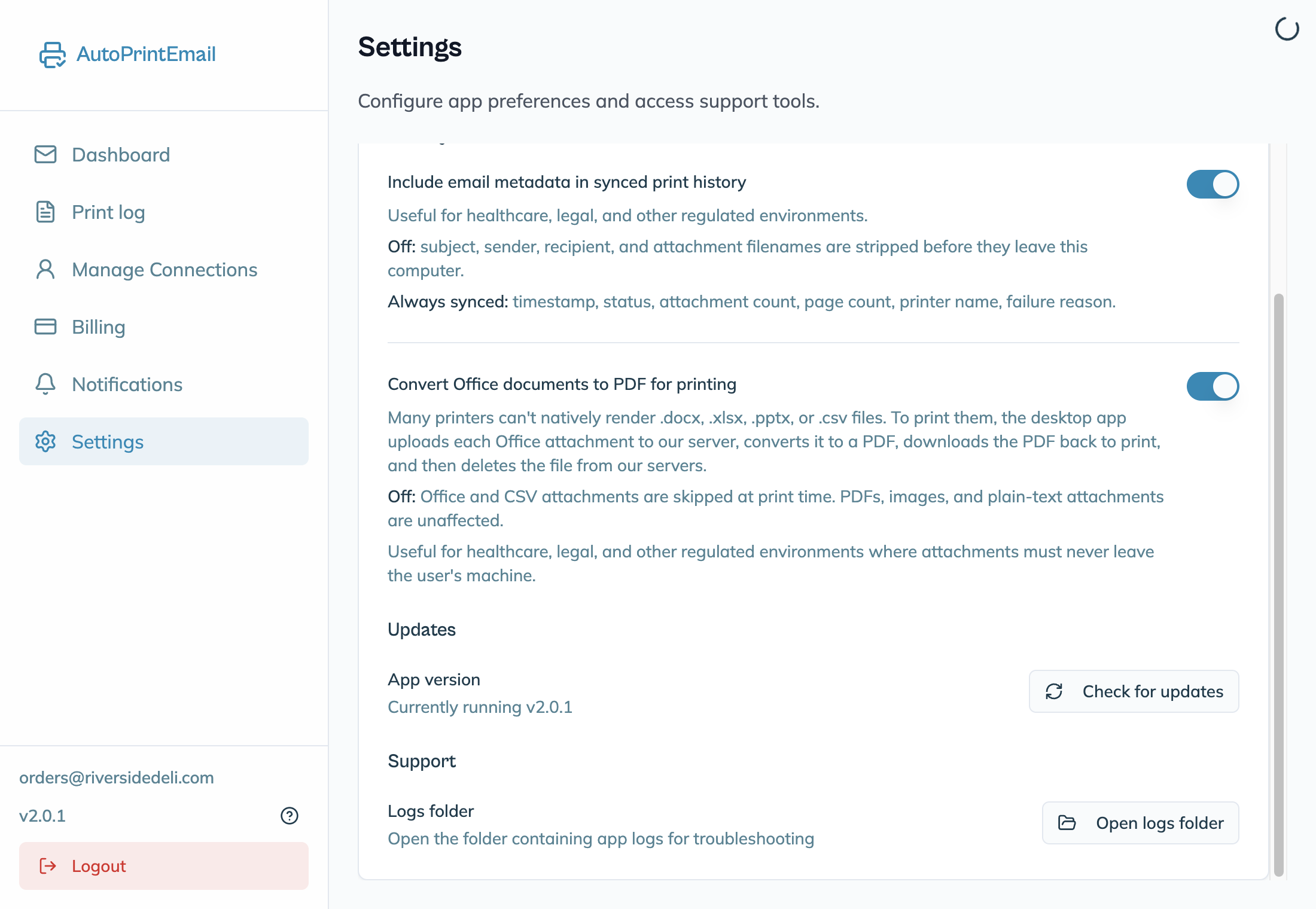
    The Updates section of Settings with the app version and Check for updates

    Installed from the Microsoft Store?

    Store copies are updated by the Store, and Settings says Updates managed by the Microsoft Store. The Store can lag a few days behind a new release while Microsoft reviews it.

    Need a fix right now? Get the direct download instead, from under the Store badge on autoprint.email/download, or straight from autoprint.email/api/ai/download/win32/x64/latest.

    On Linux?

    The app tells you when there's a new version, and you update through your package manager:

    • Ubuntu, Debian, Mint: see Install on Ubuntu, Debian or Mint
    • Fedora, RHEL, openSUSE: see Install on Fedora, RHEL or openSUSE
    • AppImage: download the new file from autoprint.email/download. See Run as an AppImage.

    Good to know

    • Nothing is lost when you update. Mailboxes, printers and rules stay as they are.
    • On a Mac running macOS 12 or older? Version 2 needs macOS 13 or newer, so your Mac stays on the last version that runs on it. Contact support if you need help.
    AutoPrintEmail

    The desktop app that sends emails directly to your printer. Reduce screen time without missing important communications.

    Quick Links

    • Automated Email Printing Guide
    • Benefits
    • How It Works
    • For Teams
    • Testimonials
    • Reviews on Trustpilot
    • FAQ
    • Privacy Policy
    • Terms of Service
    • Blog
    • About

    Download

    Get started with AutoPrintEmail today and receive a 3-day free trial.

    Get Started Free

    Email Printing

    • Automatically Print Email Attachments (PDF, Word, Excel)
    • Auto-Print Email Invoices & Receipts | Automatic Business Printing
    • Auto-Print Gmail Emails (2026 Guide) | Automatic Gmail Printing
    • Auto-Print Outlook & Office 365 Emails: No Plugin, 24/7
    • Email Printing Automation for Business Operations | Secure & Reliable
    • Click-and-Collect for Small Shops: The Complete Weekend Recipe
    • Email to Print Software: Auto-Print Emails & Attachments to Any Printer

    Compare

    • AutoPrintEmail vs ItJustPrints - Desktop or Mobile Print Station?

    Integrations

    • Auto-Print Gmail Attachments & Emails - Set It and Forget It
    • Auto-Print Outlook Emails Without a Plugin | Standalone Desktop App
    • Auto-Print Office 365 Emails: No Plugin Required
    • Auto-print Shopify inventory transfers, orders, and labels
    • Auto-Print Etsy Orders & Packing Slips - Handmade Seller Automation
    • Auto-Print IMAP/POP3 Emails - Works with Any Email Provider
    • Auto-Print Square Orders - Kitchen Tickets & Receipts
    • Auto-Print Toast POS Orders - Kitchen Ticket Printing
    • Auto-Print ShipStation Orders - Packing Slips & Shipping Labels
    • Print From Zapier Automatically - Orders, Forms and Alerts on Paper
    • Print API - Send Print Jobs to Any Printer With One HTTP Request

    Solutions

    • Email to Print - Auto-Print Emails to Any Printer
    • Auto-Print Invoices from Email: AP & AR Automation
    • Stop Manually Printing E-commerce Invoices - Automate in 2 Minutes
    • Restaurant Order Printing Automation - Auto-Print Delivery Orders
    • Legal & Real Estate Document Printing Automation
    • Logistics Waybill & Shipping Label Automation
    • Healthcare Document Printing Automation - HIPAA-Compliant Local Processing
    • Pharmacy Email Printing Software - Auto-Print Wholesaler Invoices, PBM Notices, and Compliance Docs
    • Accounting Firm Document Automation - Auto-Print Tax Docs & Client Files
    • Auto Shop Document Automation - Print Work Orders & Estimates Automatically
    • Insurance Agency Document Automation - Auto-Print Policies, COIs & Claims
    • Auto-Print Faxes From Email, Without a Fax Machine

    © 2026 AutoPrintEmail. All rights reserved.

    Privacy PolicyTerms of ServiceSecurity