AutoPrintEmail
    How It WorksTeamsPricingDownloadHelp
    Sign InGet Started Free
    1. Help
    2. How AutoPrintEmail Pricing Works: Per Computer
    On this page
    The two plansWhat counts as a computerExamplesAdding or removing computers laterGood to know
    Plans & Billing

    How AutoPrintEmail Pricing Works: Per Computer

    3 min read

    One question, one answer: how many computers print? That's what you pay for.

    Not mailboxes, not emails, not pages, not people. A computer with a printer that AutoPrintEmail prints to is one licence. Everything else is included.


    Table of Contents

    • The two plans
    • What counts as a computer
    • Examples
    • Adding or removing computers later
    • Good to know

    The two plans

    • Monthly: $29 a month per printing computer. Cancel anytime. Good for seasonal work or trying it for real.
    • Lifetime: $499 once per printing computer. Never pay again. It pays for itself in about 17 months.

    Both include every feature, unlimited mailboxes on that computer, and future updates. Every account starts with a 3-day free trial, no card needed.
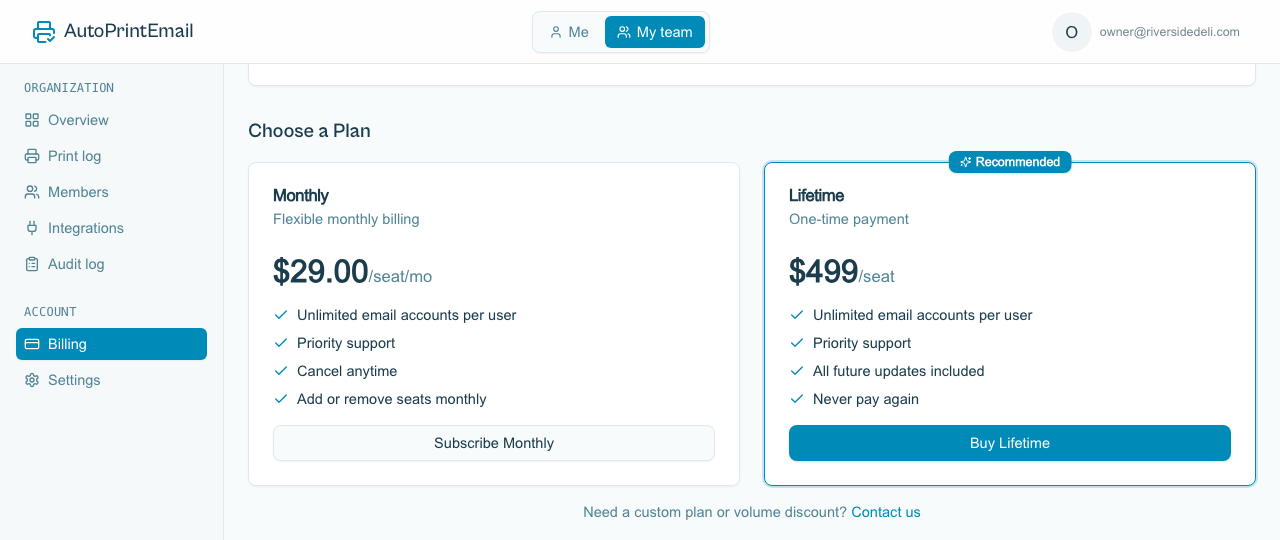
    The Choose a Plan cards on the Billing page, monthly and lifetime

    What counts as a computer

    • Counts: each login that prints (shown as Print desk on the Members page). One computer, one login.
    • Free: logins that don't print, like an owner, a manager or an IT provider who just manages the team. See Add a Free Admin Login.
    • Free: extra mailboxes on the same computer. Watch orders@, invoices@ and info@ from one PC for one price.

    Examples

    • One office PC printing two mailboxes: 1 computer. $29 a month or $499 once.
    • Three shops, one printer each: 3 computers. $87 a month or $1,497 once.
    • An owner who manages three print stations from home: still 3. The owner's login doesn't print, so it's free.

    Adding or removing computers later

    Change the number any time under autoprint.email/team > Members > Computers:

    • Monthly: adding is charged pro rata for the rest of the month. Removing gives you a credit on the next invoice. You can't go below the number of logins that print, so switch a login to Not printing or disable it first.
    • Lifetime: extra computers are a one-time $499 each, with a checkout for just the new ones. Lifetime computers can't be removed, but you can move one to a different machine or login whenever you like.

    Good to know

    • Signed up earlier at a different price? Your Billing page shows what you actually pay.
    • Switching from monthly to lifetime? Email us and we'll switch you over and stop the monthly billing.
    • Invoices with your company details: see Download Invoices and Customize Your Billing Details.
    • On Shopify? The Shopify app is billed by Shopify, with its own plans. See Set Up AutoPrintEmail for Shopify.
    AutoPrintEmail

    The desktop app that sends emails directly to your printer. Reduce screen time without missing important communications.

    Quick Links

    • Automated Email Printing Guide
    • Benefits
    • How It Works
    • For Teams
    • Testimonials
    • Reviews on Trustpilot
    • FAQ
    • Privacy Policy
    • Terms of Service
    • Blog
    • About

    Download

    Get started with AutoPrintEmail today and receive a 3-day free trial.

    Get Started Free

    Email Printing

    • Automatically Print Email Attachments (PDF, Word, Excel)
    • Auto-Print Email Invoices & Receipts | Automatic Business Printing
    • Auto-Print Gmail Emails (2026 Guide) | Automatic Gmail Printing
    • Auto-Print Outlook & Office 365 Emails: No Plugin, 24/7
    • Email Printing Automation for Business Operations | Secure & Reliable
    • Click-and-Collect for Small Shops: The Complete Weekend Recipe
    • Email to Print Software: Auto-Print Emails & Attachments to Any Printer

    Compare

    • AutoPrintEmail vs ItJustPrints - Desktop or Mobile Print Station?

    Integrations

    • Auto-Print Gmail Attachments & Emails - Set It and Forget It
    • Auto-Print Outlook Emails Without a Plugin | Standalone Desktop App
    • Auto-Print Office 365 Emails: No Plugin Required
    • Auto-print Shopify inventory transfers, orders, and labels
    • Auto-Print Etsy Orders & Packing Slips - Handmade Seller Automation
    • Auto-Print IMAP/POP3 Emails - Works with Any Email Provider
    • Auto-Print Square Orders - Kitchen Tickets & Receipts
    • Auto-Print Toast POS Orders - Kitchen Ticket Printing
    • Auto-Print ShipStation Orders - Packing Slips & Shipping Labels
    • Print From Zapier Automatically - Orders, Forms and Alerts on Paper
    • Print API - Send Print Jobs to Any Printer With One HTTP Request

    Solutions

    • Email to Print - Auto-Print Emails to Any Printer
    • Auto-Print Invoices from Email: AP & AR Automation
    • Stop Manually Printing E-commerce Invoices - Automate in 2 Minutes
    • Restaurant Order Printing Automation - Auto-Print Delivery Orders
    • Legal & Real Estate Document Printing Automation
    • Logistics Waybill & Shipping Label Automation
    • Healthcare Document Printing Automation - HIPAA-Compliant Local Processing
    • Pharmacy Email Printing Software - Auto-Print Wholesaler Invoices, PBM Notices, and Compliance Docs
    • Accounting Firm Document Automation - Auto-Print Tax Docs & Client Files
    • Auto Shop Document Automation - Print Work Orders & Estimates Automatically
    • Insurance Agency Document Automation - Auto-Print Policies, COIs & Claims
    • Auto-Print Faxes From Email, Without a Fax Machine

    © 2026 AutoPrintEmail. All rights reserved.

    Privacy PolicyTerms of ServiceSecurity